Overview
The Email Configuration section allows you to configure email addresses and control which recipients receive different types of customs-related notifications in iCustoms.
To Access Email Configuration
- Log in to iCustoms.
- From the left-hand sidebar, go to Settings under Configurations.
- Click the Email Configuration tab.
- The Email Configuration page opens.
Receive All Email Notifications
The Receive all Email Notifications option allows you to enable or disable email notifications.
Select the checkbox to enable email notifications.
Clear the checkbox to disable email notifications.
Configure CC & BCC Emails
The CC & BCC Emails section allows you to add additional recipients who should receive copies of email notifications.
- Enter the required email address in the CC Email field.
- Enter the required email address in the BCC Email field.
- Click Save to apply the changes.
Email Configuration
The Email Configuration table allows you to control which recipients receive email notifications for different customs declaration events.
The table includes the following columns:
Column | Description |
|---|---|
Status | Displays the declaration event for which email notifications can be configured. |
Submitter | Sends the notification to the user who submitted the declaration. |
Trader | Sends the notification to the trader associated with the declaration. |
Declarant | Sends the notification to the declarant associated with the declaration. |
Add. Contacts | Sends the notification to any additional contacts configured for the declaration. |
Available events may include:
- RECEIVED
- RELEASED
- ARRIVED
- DEPARTED
- CANCELLED
- AMEND REGISTERED
- ROUTE 1
- ROUTE 2
For each event, select or clear the relevant checkboxes to control which recipients receive the notification.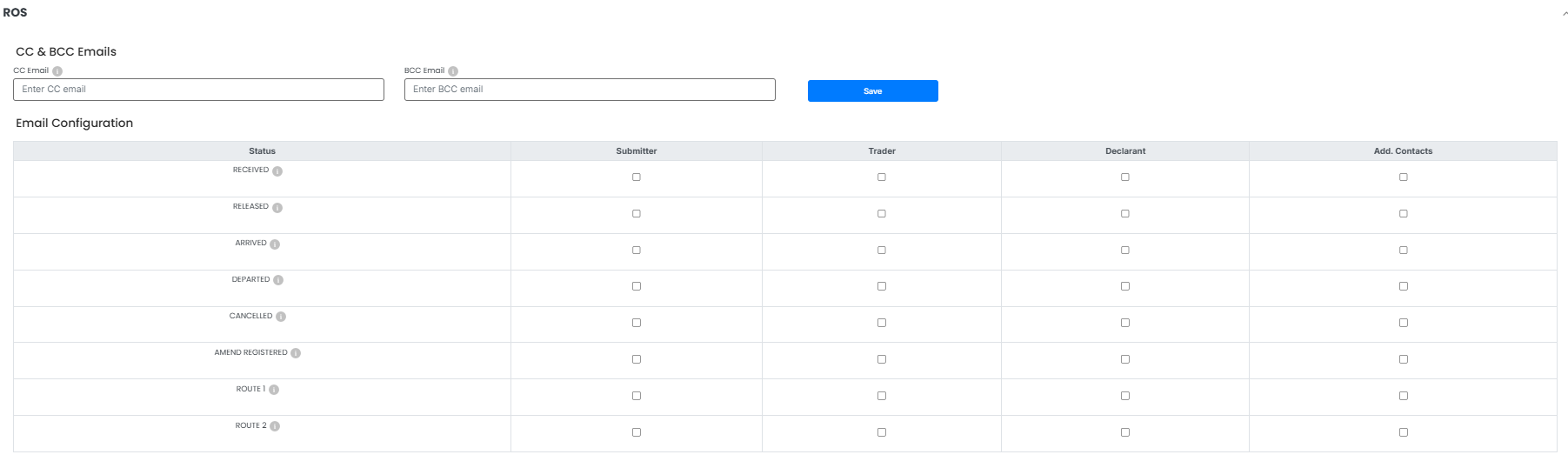
Save Your Changes
After selecting the required notification settings:
- Review the selected recipients for each event.
- Click Save to apply the changes.
Tip: Make sure the relevant recipient checkboxes are selected so that important declaration status notifications are sent to the appropriate users.
Need Help?
If you need assistance with configuring email addresses or notification settings, contact the iCustoms Support Team: Contact Support Team
Was this article helpful?
That’s Great!
Thank you for your feedback
Sorry! We couldn't be helpful
Thank you for your feedback
Feedback sent
We appreciate your effort and will try to fix the article