Overview
iDP uses AI-powered document extraction to identify and extract data from uploaded documents. If extraction accuracy needs improvement, users can submit documents for Doc Training, use iTeach to correct specific extracted values, or provide Feedback to report extraction issues.
How Do I Improve Document Accuracy?
There are three ways to improve extraction accuracy:
Doc Training: Submit documents to the Doc Training process so the Data Science team can train the model based on your specific document layout.
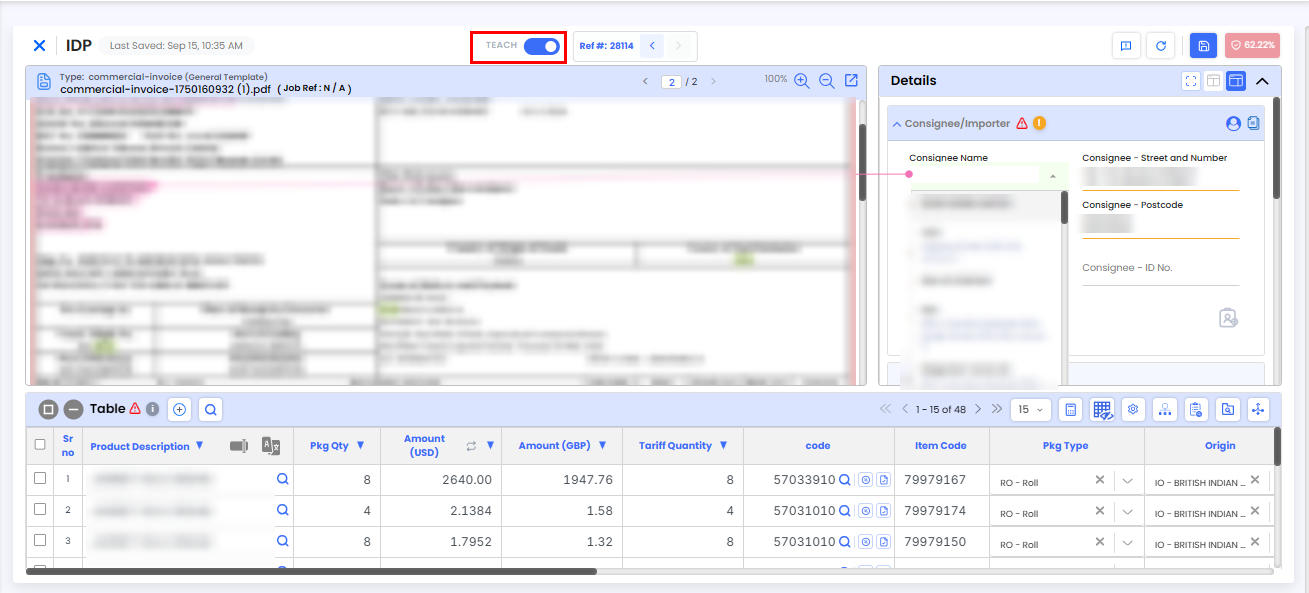
iTeach: Manually correct extracted data by selecting a field and identifying the correct value on the document. The corrected information is then sent to the Data Science team for future model improvements.
Feedback: Submit feedback to report specific extraction issues for investigation and future reference.
Why Is My Extraction Accuracy Low?
Low extraction accuracy can be caused by:
Low-resolution or poor-quality document uploads
Unusual or complex document layouts
Unclear or inconsistent text formatting
To improve extraction accuracy, try uploading a higher-resolution document or submitting the document for Doc Training. You can also use Feedback to report specific extraction issues.
How Do I Correct or Train Incorrectly Extracted Values?
The iTeach feature allows you to identify the correct location of an extracted value and send this information to the Data Science team for future improvement.
To use iTeach:
Select the field containing the incorrectly extracted value.
In the document preview, draw a bounding box around the correct value.
Submit the correction using iTeach.
How Can I Reduce Manual Corrections?
You can reduce manual corrections by using iDP features that automate or simplify data entry:
Use iTeach to improve extraction of specific fields.
Use Distribute to allocate a value across items based on another field.
Use Copy, Move, or Expand to apply values across multiple fields or items.
Apply the EU Scheme with a single click instead of updating each field manually.
Need Help?
If you need assistance with document extraction or improving accuracy, contact the iCustoms Support Team: Contact Support Team
Was this article helpful?
That’s Great!
Thank you for your feedback
Sorry! We couldn't be helpful
Thank you for your feedback
Feedback sent
We appreciate your effort and will try to fix the article