Overview
iDP allows you to combine multiple documents and merge item lines into a single set of data. This is useful when information is spread across documents such as invoices and packing lists.
Documents can be combined automatically using Auto Combine or manually by selecting the relevant items.
How Do I Combine Multiple Documents into One?
When uploading multiple documents, enable Auto Combine to combine corresponding line-item values from different documents into a single unified entity.
How Can I Merge an Invoice and Packing List Together?
Documents can be merged using a designated key, such as:
Item Code
Product Description
Commodity Code
Package Quantity
Tariff Quantity
Net Mass
Gross Mass
Items can also be merged manually by selecting one item from each document and clicking Combine.
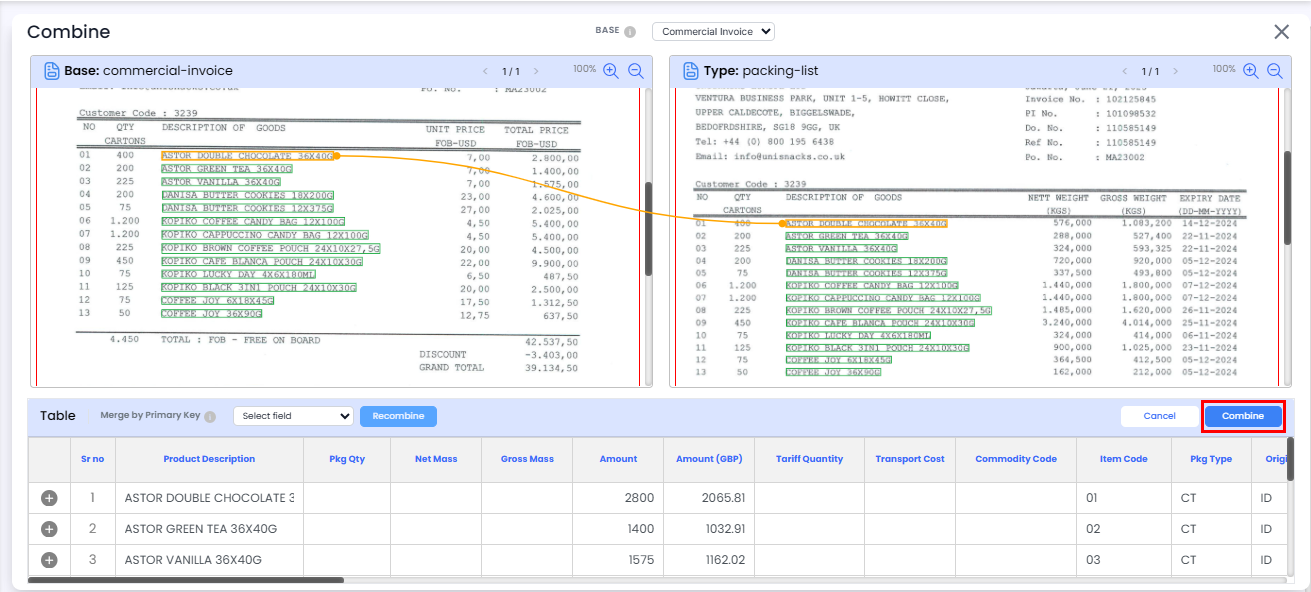
How Does Auto-Merge Decide Which Items to Combine?
Auto-merge compares items across documents using the following fields:
Item Code
Commodity Code
Product Description
The system checks these fields in order of priority. If a matching value is found across documents, the corresponding items are combined.
Need Help?
If you need assistance with combining documents or merging item lines, contact the iCustoms Support Team: Contact Support Team
Was this article helpful?
That’s Great!
Thank you for your feedback
Sorry! We couldn't be helpful
Thank you for your feedback
Feedback sent
We appreciate your effort and will try to fix the article