Overview
The iDP (Intelligent Document Processing) workflow allows you to process documents from upload and data extraction through review, completion, and final submission.
To process a document from start to finish:
Add the document manually from the iDP listing page, or submit it through iMail for automatic extraction.
Once the extraction queue job is completed, the system will direct you to the iDP listing.
Open the document to preview it and review the extracted fields.
Apply any required validations, rules, or formulas and configure custom templates for extraction, if required.
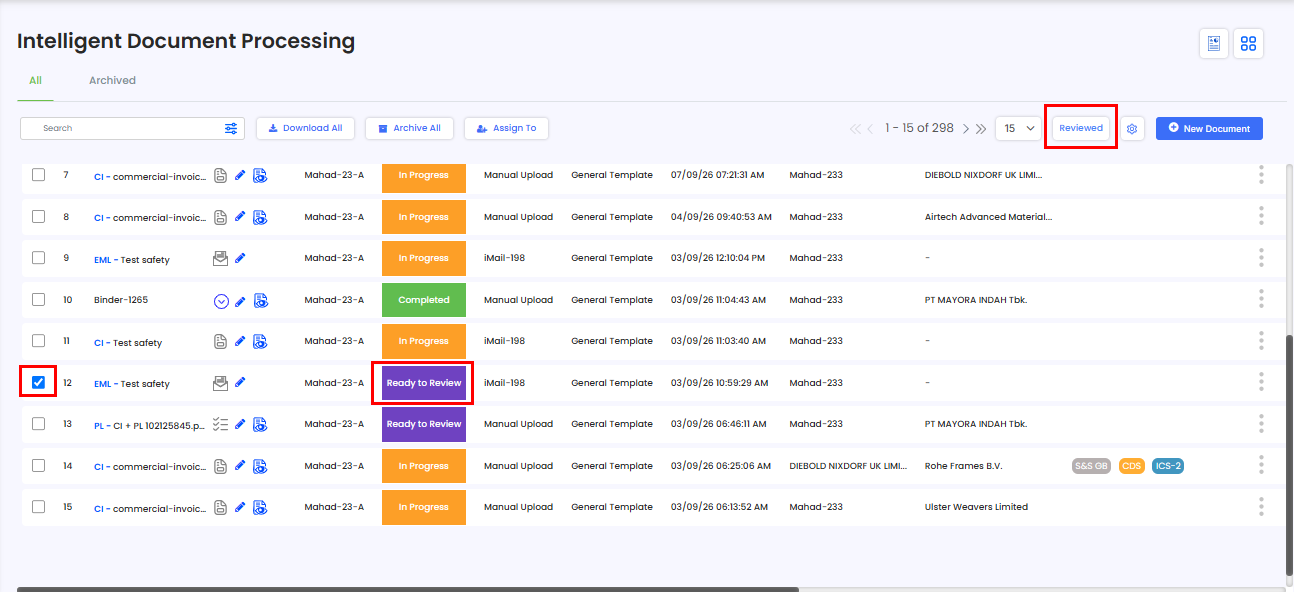
If there are no validation errors, select the checkbox next to the document marked “Ready to Review”.
Click Reviewed from the listing page, or use the Reviewed button on the iDP edit page.
The document status will change to “Completed.”
From there, you can generate a declaration or perform the required final action using the three-dot menu.
Once the final action is completed, the document status will update to “Submitted.”
Need Help?
If you need assistance processing documents through iDP, contact the iCustoms Support Team: Contact Support Team
Was this article helpful?
That’s Great!
Thank you for your feedback
Sorry! We couldn't be helpful
Thank you for your feedback
Feedback sent
We appreciate your effort and will try to fix the article