Overview
iDP allows users to create XML templates to structure and map data between XML files and iDP fields. Once configured, the template can be used to automatically populate the relevant fields with the extracted data.
How Do I Set Up an XML Template?
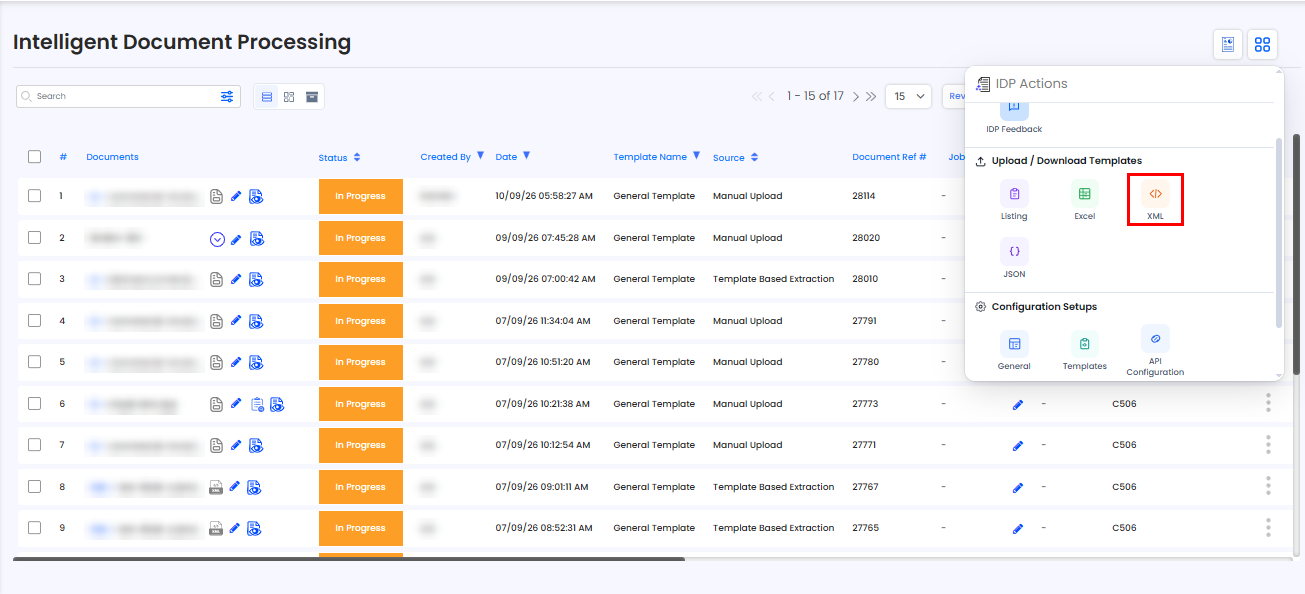
An XML template can be created from the Action Menu:
Open the Action Menu.
Select Upload/Download Templates – XML.
Configure the XML template according to your requirements.
How Can I Map XML Tags to Fields?
XML tags can be dynamically mapped to their corresponding fields in iDP.
Once the mapping is configured, values extracted from the XML file are automatically populated into the relevant iDP fields or XML tags according to the template configuration.
Need Help?
If you need assistance with creating or configuring XML templates, contact the iCustoms Support Team: Contact Support Team
Was this article helpful?
That’s Great!
Thank you for your feedback
Sorry! We couldn't be helpful
Thank you for your feedback
Feedback sent
We appreciate your effort and will try to fix the article