Overview
The currency conversion feature in iDP allows users to convert extracted values from one currency to another. The system applies the exchange rate published by HMRC, while also allowing users to manually override the rate when required.
Step by Step guide:
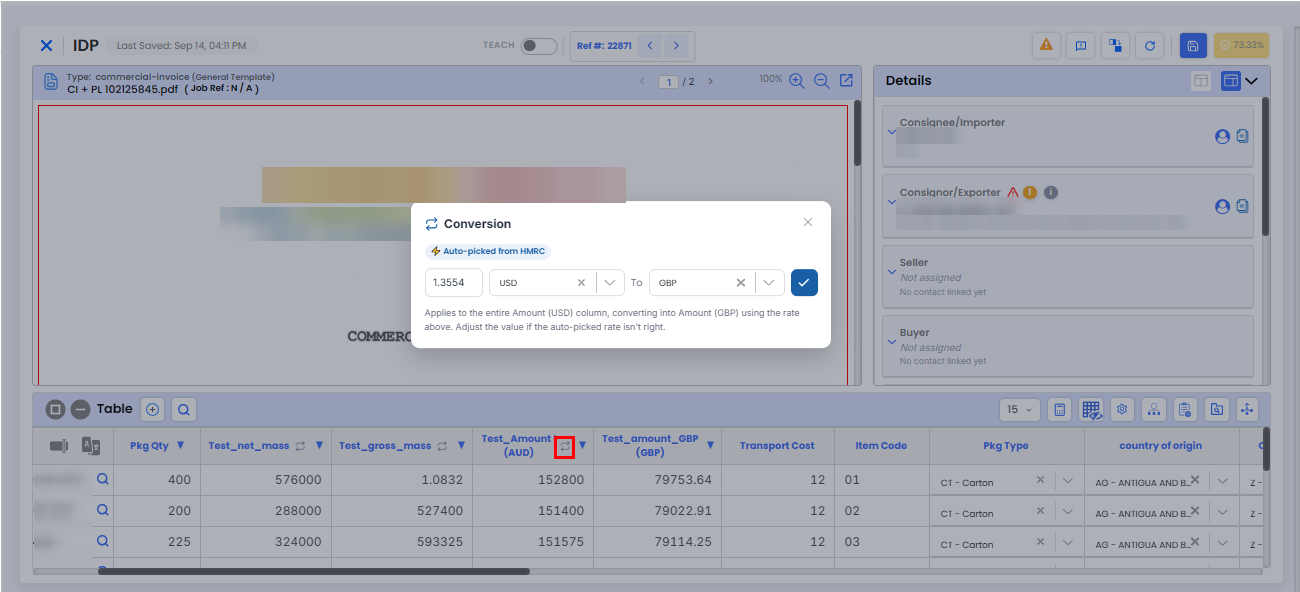
On the iDP Edit page, select the Currency Conversion icon.
A conversion modal will open.
Select the Current Currency and Target Currency.
The system will automatically apply the exchange rate published by HMRC.
Confirm the conversion.
A new column displaying the converted values will be added to the document.
How Are Exchange Rates Applied?
Exchange rates are applied based on the rates published by HMRC.
Can I Change or Override the Exchange Rate?
Yes. The exchange rate can be manually edited and overridden using the Exchange Rate input field.
How Does Currency Conversion Impact Totals?
Original and converted currency values are stored separately in dedicated Original Amount and Converted Amount columns.
The Converted Amount column is automatically updated based on the applied exchange rate.
Need Help?
If you need assistance with currency conversion in iDP, contact the iCustoms Support Team: Contact Support Team
Was this article helpful?
That’s Great!
Thank you for your feedback
Sorry! We couldn't be helpful
Thank you for your feedback
Feedback sent
We appreciate your effort and will try to fix the article